New Worklix brings monitoring, time tracking and collaboration into one workforce platform.

See pricing

Product overview One connected workforce platform

Run workforce operations from one workspace

Worklix connects employee monitoring, time and attendance, workforce management, analytics and team communication so managers can understand the workday without stitching disconnected tools together.

✓ Monitor work clearly✓ Track time and attendance✓ Keep teams connected
One product, four connected workflows

Everything managers need to understand and support the workday.

Each Worklix product area shares the same people, permissions and reporting context, so teams can move between monitoring, time, workforce management and communication without rebuilding the workflow in separate systems.

Monitor

See activity with useful context.

Review work status, screenshots, apps, websites and productivity signals without turning visibility into noise.

Explore Monitoring
Track

Turn time into reliable records.

Keep clock-ins, breaks, attendance, schedules and daily hours connected to the same workforce records.

Explore Time Tracking
Manage

Keep people and access organized.

Manage employees, departments, roles, permissions and devices from one shared workspace structure.

Explore Management
Collaborate

Keep communication beside the work.

Move into chat, calls, files and screen sharing without losing the operational context behind the conversation.

Explore Collaboration
Product in motion

See the whole workday in one connected view.

Worklix brings time, attendance, activity, productivity, people and collaboration into one operational view so managers can understand the workday before moving into the next action.
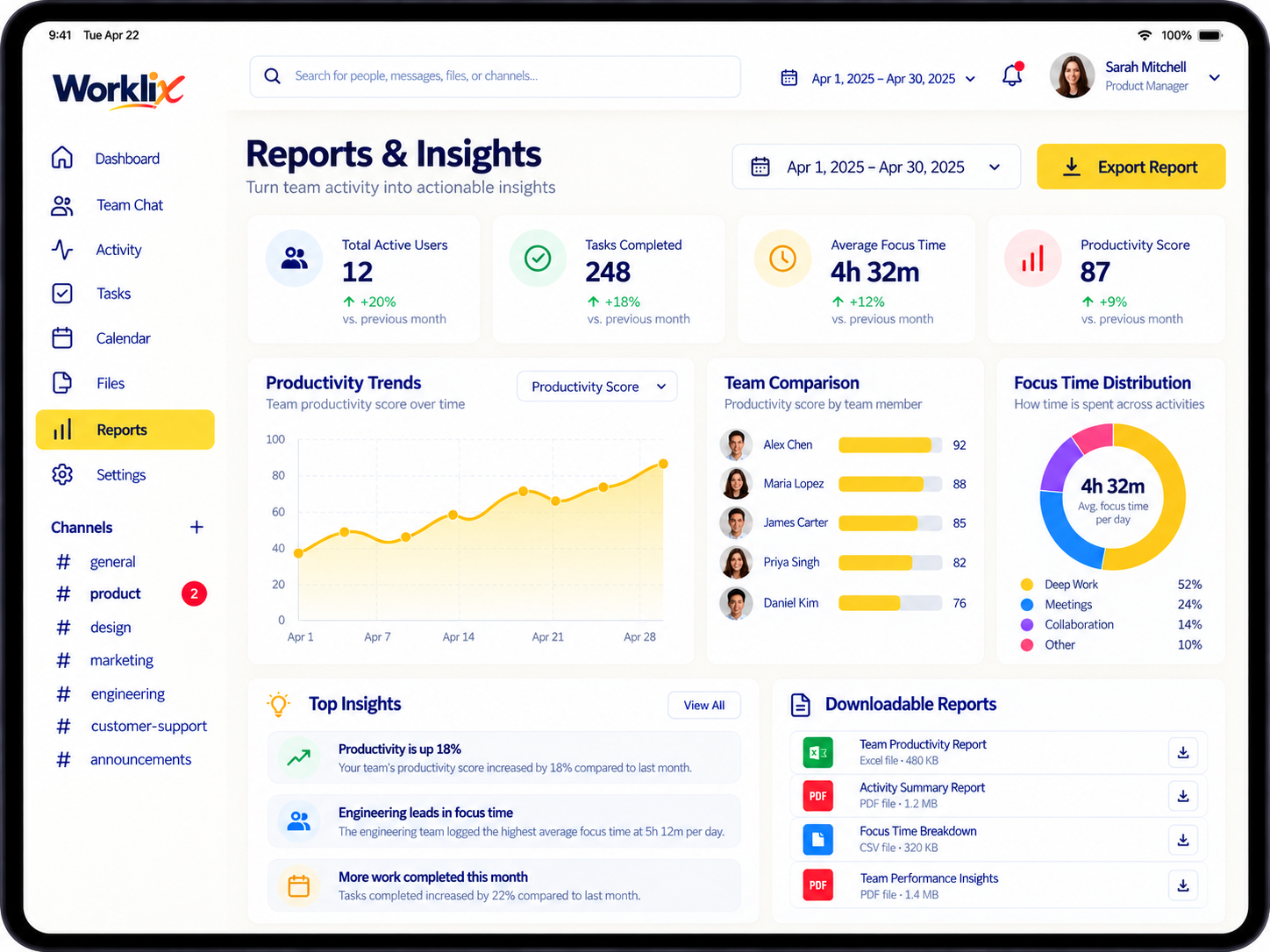
Worklix connected workforce reports and insights dashboard
01

See the signal

Review activity, attendance and productive time together so managers can understand the workday without piecing together separate reports.

02

Understand the context

Keep employee, department, app usage and work patterns together so managers can understand the context behind every signal they review.

03

Move into action

Open the relevant workflow, communicate with the team and review reporting while keeping the same context behind every management decision.

People + permissions

Keep workforce structure as clear as the activity.

Keep people, responsibility and access connected before managers review the workday. Worklix organizes employees, departments, roles and devices so every activity signal arrives with useful workforce context.

Reports + decisions

Turn daily workforce data into decisions managers can use.

Daily data is only valuable when a manager can understand what changed and what deserves attention. Worklix connects productivity, work hours, attendance and app usage into reporting that is easier to compare, explain and use during reviews.

Productivity trendsCompare team patterns over time.
Attendance contextReview presence beside work hours.
Usage visibilitySee the apps and websites behind the day.
Exportable reportsTake structured workforce data into reviews.
Explore Analytics
Worklix reports and workforce insights dashboard
Productivity 78% team average
Focus time 5h 42m daily average
Explore the product

Go deeper into the capability your team needs next.

Start with the workflow that matters today. Every capability stays connected to the same workforce, reporting and management context as your operation grows.

01 Screenshots Review visual work context with employee and activity details attached in one clear monitoring view. Hover to explore Screenshots See screenshots beside employee identity, activity signals, tracked time and surrounding work context so managers can understand what happened without opening separate tools.Explore capability 02 Apps & websites Understand which apps and websites support focused work across the day and where time is being spent. Hover to explore Apps & websites Review app and website usage beside tracked hours, employee context and productivity signals so managers can understand the tools behind focused work and spot patterns worth reviewing.Explore capability 03 Attendance Keep presence, lateness and leave connected to daily workforce records instead of isolated attendance logs. Hover to explore Attendance Bring clock-ins, absences, late arrivals and daily work records together so managers can compare attendance against schedules and understand the full context behind each workday.Explore capability 04 Break & idle time Add break and inactivity context without separating it from the rest of the employee workday. Hover to explore Break & idle time See break periods and idle time beside tracked hours, attendance and activity so managers can understand interruptions without treating every inactive period as a separate issue.Explore capability 05 Work schedules Set expected working patterns managers can compare against actual hours, attendance and daily activity. Hover to explore Work schedules Create clear schedules for teams, shifts and working hours, then compare expected time with actual attendance and tracked work so managers can review exceptions with better context.Explore capability 06 Reports Turn daily workforce activity into trends, comparisons and structured management reviews your team can use. Hover to explore Reports Combine time, attendance, productivity, app usage and employee structure in reporting that helps managers compare periods, identify changes and prepare more useful operational reviews.Explore capability 07 Voice & video Bring calls and meetings closer to the people, projects and work being discussed across the team. Hover to explore Voice & video Keep voice and video conversations inside the same workspace as employee context, files and daily activity so managers can move from a signal into a conversation without losing context.Explore capability 08 File sharing Keep shared work, documents and access close to team communication and day-to-day workforce activity. Hover to explore File sharing Share files beside the conversations and people they belong to, helping teams keep operational context together instead of moving documents across disconnected communication tools.Explore capability
One connected product

Bring workforce visibility and team operations into one platform.

Start with the product area your team needs now, then expand into monitoring, time, analytics, workforce management and communication without rebuilding the workflow around another tool.