
Separate deep work from meetings, collaboration and shorter work bursts.
Productivity with context
Read focus time clearly
See repeated slowdowns
Review teams in context
Turn activity into thenext useful question.
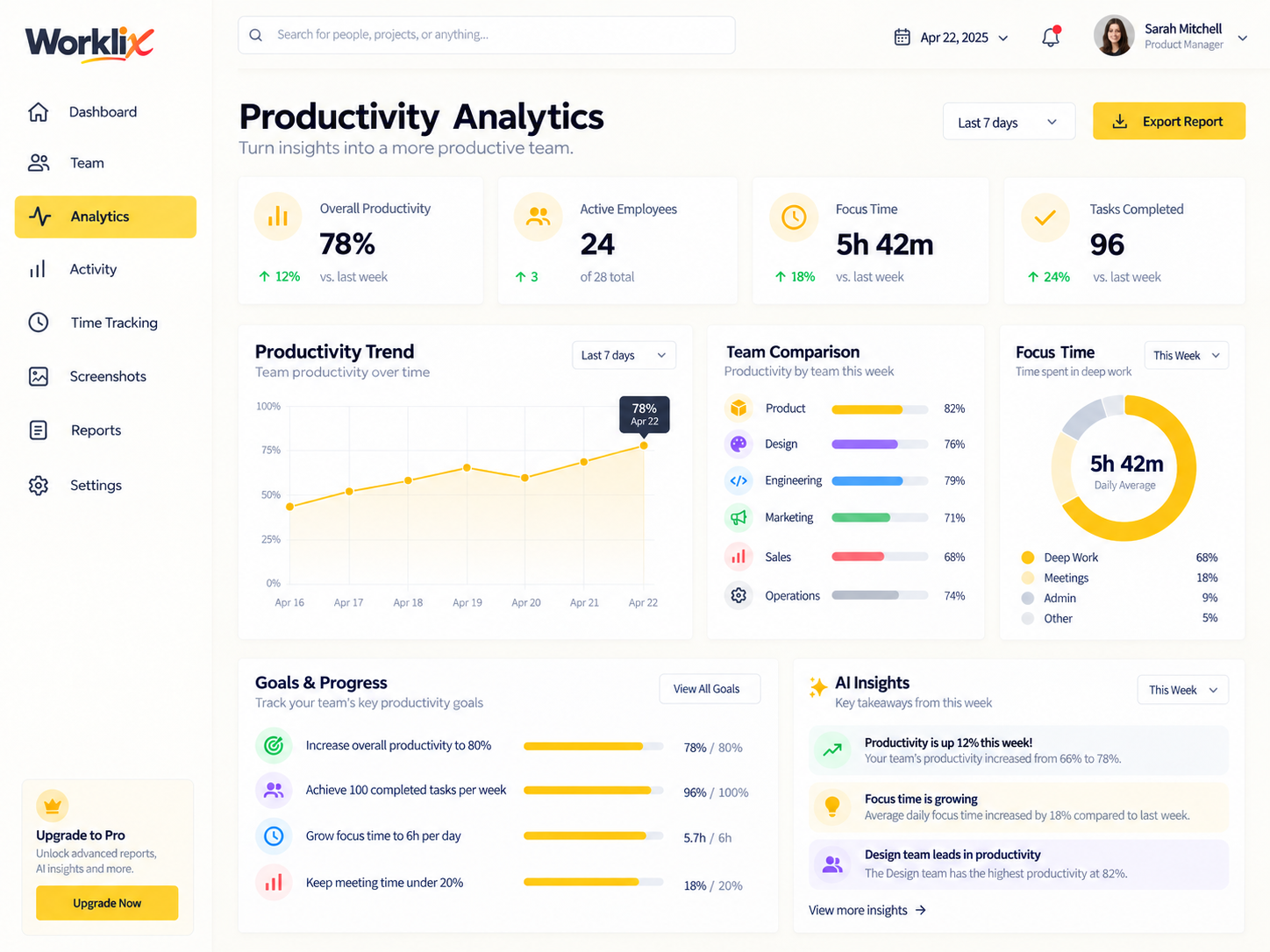
Worklix connects productivity analytics to the same people, time and department structure your team already uses. That means trends stay grounded in the workday instead of becoming another disconnected report.
Compare days and weeks so one odd session does not get treated like a trend.
Move from the company view into a department or employee view without rebuilding the data.
Why it helps
Managers can spot friction, ask better follow-up questions and coach the workflow before small drops become bigger operational issues.
Check whether extra sync time is shrinking the focus blocks that normally carry delivery work.
Both teams share the same release window, but only one shows a repeated focus-time drop.
Focus time
5h 42m
+18% vs last week
Best next step
Review meetings
Product team lost 46m to repeat syncs.
Useful signals
Focus time
Active time
Idle context
See focus, activity and idle timewithout mixing them together.
Productivity gets easier to understand when each signal has its own place. Review the work pattern, then decide whether the issue is distraction, overload, coordination or simply a different type of work.
Measure protected work time so uninterrupted blocks are easy to defend.
Use activity trends to understand pace across individuals, teams and date ranges.
Keep breaks, pauses and away time visible so managers do not jump to lazy conclusions. Wild concept, we know.
78%overall productivity
Deep work
68%
Meetings
18%
Admin
9%
Idle / away
5%
Focus time improved over the last 7 days.
Review high meeting load before it becomes drag.
Next reviewThursday · 10:00
Recheck the same mix after the team removes two recurring status meetings. If focus time improves, the workflow change has a measurable result.
From signal to decision
SignalFocus time down 11%Product · last 7 days
ContextMeetings up 22%Three recurring blocks added
Turn one changed patterninto one useful action.
Instead of switching between four report modes, start with the change that matters and keep the evidence, likely cause and next review in one decision flow.
NOTICE THE CHANGEFocus blocks are getting shorter.
SignalThe same team still logs a full workday, but uninterrupted work has fallen across four consecutive days.
CHECK THE CAUSECalendar load moved first.
ContextTwo new status meetings and one review call now split the longest deep-work window in the afternoon.
TEST ONE CHANGEProtect a 90-minute focus block.
ActionMove the repeat syncs together, then review the same team and time range after the next reporting window.

Better than a leaderboard
Check recurring dips
Share reports clearly
Coach with evidence
Compare teams withoutflattening the work.
Use productivity analytics to spot where a team needs help, then connect the numbers to the workflow behind them. That keeps review practical for operations and more credible for everyone else.
See whether the pattern follows a department, a specific tool or a repeated meeting block.
Export a readable view for managers without dumping every low-level detail into the conversation.
Bring focus time, attendance and workload context into the same follow-up discussion.
Responsible visibility
Role-based views
One reporting model
Practical exports
Give managers enough contextwithout opening everything.
Productivity data is most useful when it is shared at the right scope. Worklix uses the same role and department structure across the platform so reporting stays useful without turning into unrestricted surveillance.
Managers review their own teams, while broader access stays with the people who actually need it.
Time, activity, attendance and productivity stay connected instead of being merged manually later.
Send leadership the summary they need while keeping sensitive detail inside the proper workflow.
Team leadOwn team trends
Department headCross-team patterns
OperationsCompany-wide reporting
ExecutiveSummary exports
When a number changes, managers can trace it back to team structure, schedules, applications and work patterns instead of forcing the conversation to start from scratch.
Explore reports →Improve Productivity FAQ
Review productivity withclearer context and less guesswork.
Use one connected system for focus time, team trends, application usage and follow-up reporting.
What does Worklix use to show productivity?
Worklix combines activity trends, focus time, tool usage and team context so productivity is tied to the workday instead of a single abstract score.
Can managers compare teams and date ranges?
Yes. Managers can review periods side by side, compare departments and move from a broader trend into the specific team or employee context that needs attention.
Can productivity data stay aligned with privacy boundaries?
Yes. Role and department permissions help keep visibility aligned with responsibility so managers see the context they need without automatically opening the whole workspace.
How does this help with coaching and follow-up?
Instead of reacting to one number, managers can review trend movement, workload, focus time and surrounding operational context before deciding what action makes sense.
Worklix
Bring your workforce into one platform.
Start with the core workspace today and grow into the capabilities your team needs.