Active & idle time
See when work is active, where long gaps appear and how the day is distributed across actual sessions.
Workday timelineNew Worklix brings monitoring, time tracking and collaboration into one workforce platform.
See pricing
Teramind, DeskTime and Insightful all center employee monitoring around practical activity signals rather than one isolated metric. Worklix follows the same real-world pattern: collect the signals managers need, then keep them together so the review has context.
See when work is active, where long gaps appear and how the day is distributed across actual sessions.
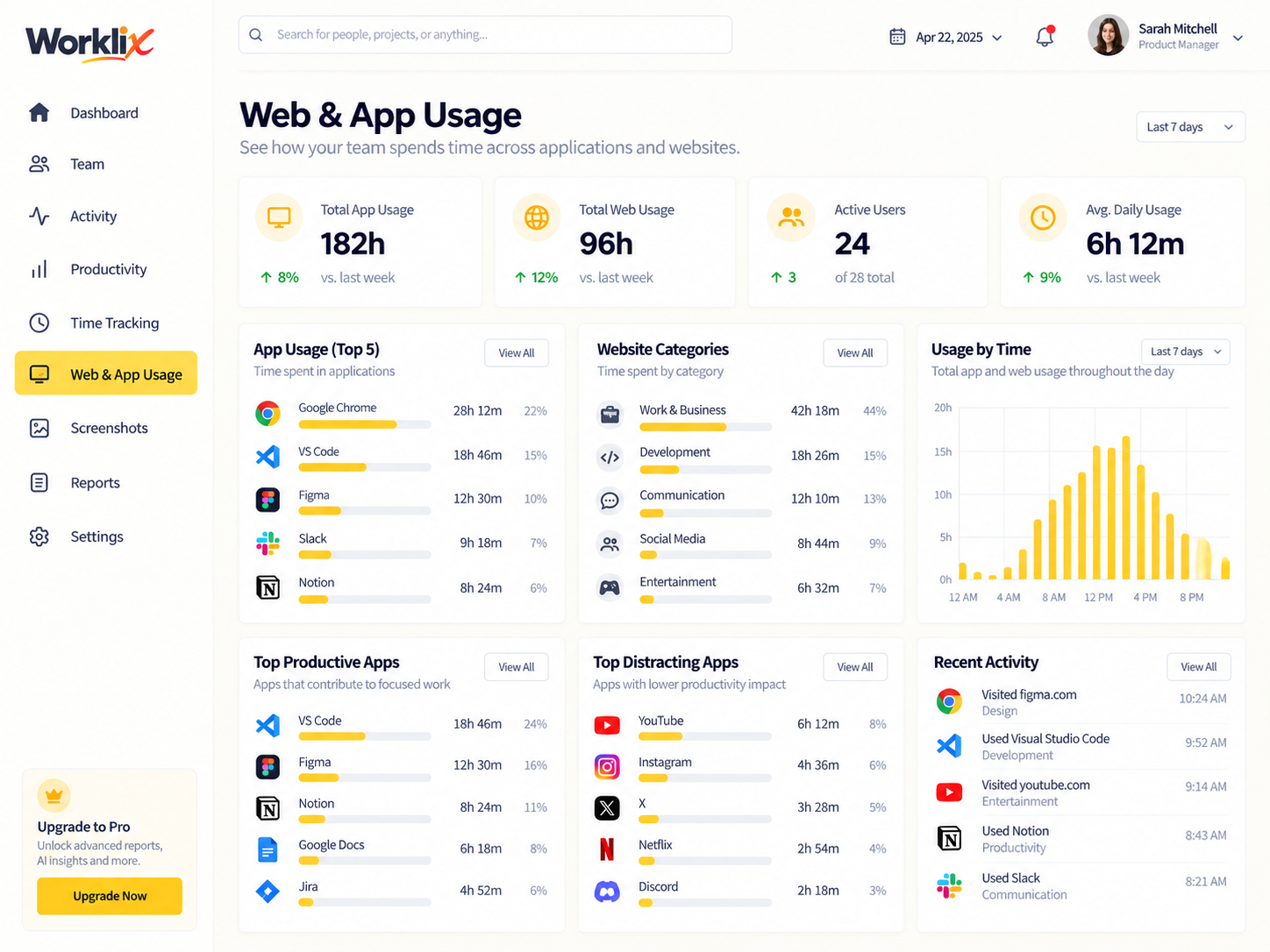
Workday timelineUnderstand which tools support the workday and where browser or application usage changes across roles or teams.
Usage contextReview captured intervals when a manager needs more context around a work session, task or client-delivery question.
Interval contextCompare day-to-day patterns so managers can spot workflow friction, changing habits or workload imbalance earlier.
Manager-ready trendsWorklix keeps activity signals close to the employee, time and team context around them so a manager can review what happened without jumping across separate tracking tools.
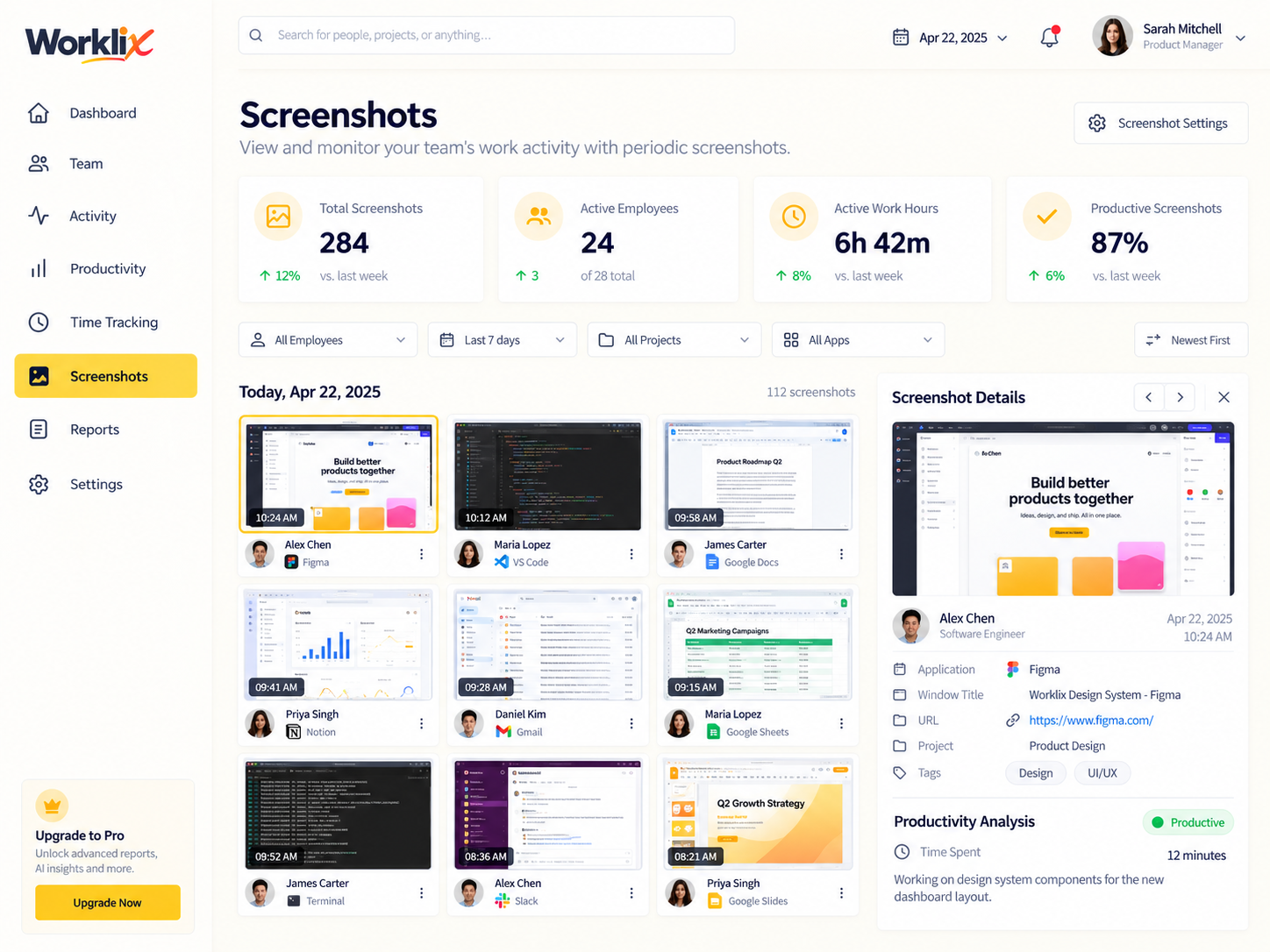
Review active time, idle periods, screenshots and tool usage together so the workday starts with observable context.
Keep each signal tied to the employee and work session so managers can understand what happened before drawing a conclusion.
Use the same record for coaching, workload review or operational follow-up instead of rebuilding the story across separate tools.
Worklix combines session timing, activity and tool context in one timeline so managers can review the day as a sequence of real work patterns instead of a disconnected score.
See when work began, where active blocks happened and which gaps need context.
Apps and websites stay tied to the same work period so the timeline explains more than hours alone.
Use screenshots and detailed activity as supporting context when a closer review is justified.
Used during recorded work intervals.
Available beside the same timeline.
Time, tools and evidence stay together.
Monitoring becomes more useful when the evidence behind a trend is easy to reach. Worklix keeps applications, websites and screenshots connected to the same employee and workday so managers can review the reason behind a pattern before they respond.
Competitive platforms increasingly position employee monitoring around transparency, privacy and role-based use. Worklix keeps the same principle practical by tying monitoring depth to the people responsible for reviewing the work.
Give administrators, managers and reviewers access to the level of activity context they need for their responsibility.
Use apps, websites and screenshot reviews as operating context rather than treating every signal as a performance verdict.
Keep monitoring tied to employee, team and workday records so the context stays understandable during review.
Employee monitoring should adapt to the operating model. Worklix keeps the core signals consistent while giving remote, hybrid, support and service teams a clearer way to review the workday.

Review active time, apps and session patterns even when managers and employees work in different locations.
Use the same activity context across office and remote days so reviews stay consistent.
See the work session behind quality or productivity questions before a manager starts a review.
Use activity trends to find repeated gaps, tool switching and work patterns that deserve process attention.
Set expectations around visibility, access and the purpose of monitoring so the data supports better operations instead of creating unnecessary ambiguity.
Worklix brings active and idle time, applications, websites, screenshots and work patterns into a connected employee and workday view.
Yes. Apps and website activity can be reviewed alongside time and other workday context so managers can understand how tools are being used across the team.
Screenshots provide visual context for selected work intervals and are most useful when a manager needs to review a specific period in more detail.
Yes. The same monitoring view can support remote, hybrid and in-office teams by keeping workday signals consistent across different locations and schedules.
Start with employee monitoring, then connect time, attendance, workforce management and reporting in the same Worklix platform as your team grows.