
New Worklix brings monitoring, time tracking and collaboration into one workforce platform.

See pricing
Hybrid Teams One connected workforce platform

One operating view for office days and remote days.

Give managers one consistent view of schedules, attendance, workload and team context across office and remote days.

✓ Office + remote context✓ Outcome-focused visibility✓ Privacy-aware controls
One team, two work settings

See the workday clearlywherever the team is working.

Hybrid teams need a shared operating picture, not separate office and remote workflows. Worklix keeps schedules, attendance, active work and team context connected so managers can review the day without rewarding location over results.

Know the planned locationKeep office and remote days visible beside the work schedule.
Read attendance in contextCompare planned hours with actual starts, breaks and recorded work.
Keep outcomes centralUse workload and work patterns to guide follow-up instead of desk presence.
Spot uneven coverageSee when a hybrid pattern creates thin support or handoff gaps.
Hybrid weekProduct & Support · Sep 14–18
24 people
Office days46%
Remote days54%
Coverage96%
Team memberMonTueWedThuFri
AMAmandaOfficeRemoteOfficeRemoteRemote
RJRaviRemoteRemoteOfficeOfficeRemote
LHLenaOfficeOfficeRemoteOfficeRemote
DKDerekRemoteOfficeRemoteOfficeOffice
OfficeRemoteLocation supports context — not performance scoring.
Compare patterns, not places

Understand what helps the teamperform across both settings.

Use the same productivity, focus and workload signals across office and remote days so managers can see patterns without turning hybrid work into a location contest.
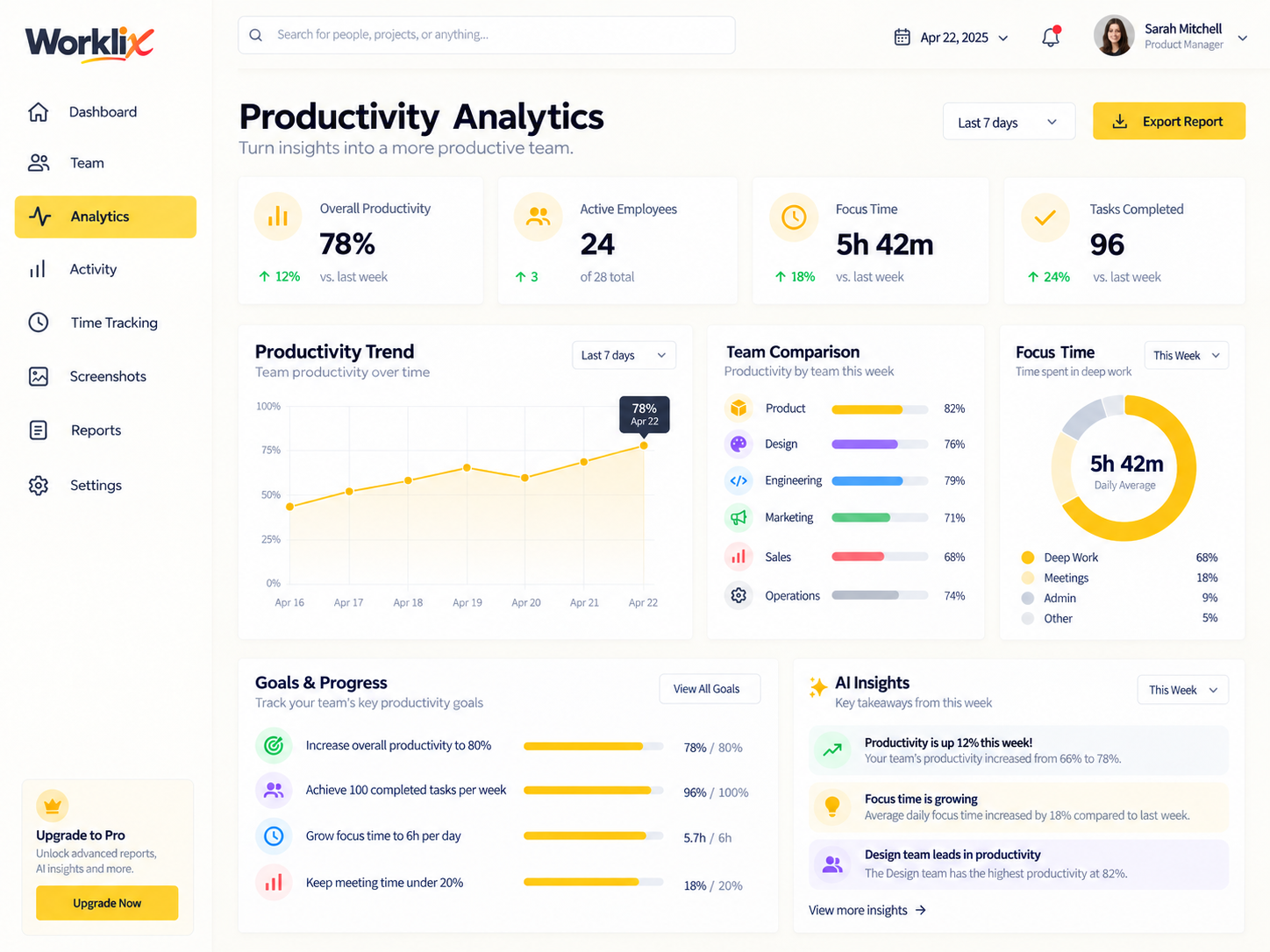
Live team patternProductivity workspace
Worklix productivity dashboard showing real hybrid team work patterns
Focus time4h 18m
Schedule match92%
Schedule adherence

Keep planned hours and actual work close.

See whether late starts, early finishes or unusual gaps follow a location pattern or a broader scheduling issue.

92%
Workload balance

Spot pressure before it turns into burnout.

Compare sustained activity, focus blocks and queue pressure across the team, not just one employee.

76%
Hybrid team collaborating around a laptop in an office
Team contextUse the same standards across every work setting.
Use shared time for high-value work

Bring people togetherwhen the room adds value.

Office time works best when it creates something remote work cannot replace: faster decisions, richer feedback, onboarding context and shared problem solving.

01
Workshops and planningUse the room for sessions that depend on live debate and shared context.
02
Onboarding and coachingBring newer teammates closer to the people and examples they need.
03
Decisions with consequencesHandle complex tradeoffs together, then document the result for remote follow-up.
Hybrid team collaborating together around a laptop
Shared-day agendaWednesday
09:30
Roadmap workshopDecision session
Room
12:00
Async focus blockIndividual execution
Anywhere
14:30
Design critiqueLive feedback
Room
Handoffs that survive location changes

Keep ownership clearacross every handoff.

Hybrid work breaks when the context lives in hallway conversations. Keep the decision, owner, file and next action visible so tomorrow's remote day starts with the same information as today's office day.

Decision capturedWrite down what changed before the meeting ends.
Owner assignedShow who continues the work and when they pick it up.
Evidence attachedKeep files, screenshots and notes close to the handoff.
09:20Office workshop closesProduct team records the decision and tags the next owner.
13:40Remote owner picks it upRavi sees the notes, file and open question in the same thread.
16:15Support validates the changeThe outcome is attached before the next office day begins.
Office day plannerWednesday
09:00
Project kickoffHigh collaboration
Office
11:30
Deep work blockIndividual execution
Anywhere
14:00
Design reviewFast feedback
Office
16:00
Follow-up workIndependent
Anywhere
Best use of the office:Shared decisions, onboarding, collaboration and live problem solving.
Expected outcome2 decisions closedKickoff scope and design direction leave the room with owners attached.
Remote follow-up3 focus tasks protectedExecution moves back to individual work instead of extending the meeting day.
Plan the reason, not just the location

Make office days usefulbefore asking people to commute.

Hybrid policies work better when the office day has a clear purpose. Use schedule context to place collaborative work together and protect remote time for focused delivery.

Best office useShared decisions + feedback
Protect remotelyDeep focus + execution
01Cluster collaborationPut workshops and reviews on the days people are already together.
02Protect focus timeAvoid filling office days with meetings that could happen asynchronously.
03Reduce coordination debtMake the reason for each shared day obvious to the team.
Visibility without micromanagement

Keep privacy boundariesclear across every work setting.

Hybrid visibility should explain work patterns without turning every location change into surveillance. Use role-based access and only the signals a manager actually needs.

Keep the rule consistentThe same visibility standard should apply whether someone works from home, the office or another approved location. Managers get work context — not unrestricted access.
Work hours onlyRole-based viewsOutcome contextProtected settings
Manager visibilityHybrid team scope
Attendance contextTeam schedule + actual workday
Visible
Productivity trendsTeam and employee patterns
Visible
Office / remote planLocation context for scheduling
Visible
Admin controlsWorkspace-wide settings
Protected
Unrelated departmentsOutside manager scope
Protected
Laptop showing a remote video meeting for a hybrid team
Hybrid work in practiceUse shared visibility to support the team, not to recreate the office online.
Team health across locations

Review workload, focusand friction before location.

Use a wider set of signals to understand whether the team is working well: sustained focus, workload balance, attendance consistency, collaboration patterns and repeated bottlenecks.

Focus stabilityHealthy
84%
Workload balanceWatch
71%
Schedule consistencyHealthy
89%
Hybrid Teams FAQ

Run hybrid work withclearer context and less guesswork.

Keep office and remote work inside one operational model instead of managing two separate systems.

How does Worklix support hybrid teams?

Worklix can bring schedules, attendance, time records, productivity patterns and team communication into one view so managers can review work consistently across office and remote days.

Can managers compare office and remote work fairly?

Yes. The better approach is to use the same outcome and workflow signals across both settings rather than treating location itself as a performance score.

Can hybrid schedules and office days stay visible?

Yes. Teams can keep planned workdays and location context close to attendance and schedule records so coordination is easier.

How do permissions work for hybrid managers?

Role and department boundaries can keep managers focused on the teams they actually supervise while sensitive admin settings remain protected.

One connected product

Run hybrid work withoutsplitting the team into two systems.

Connect schedules, attendance, workload and team context across office and remote days.