
Applications by durationSee the tools taking the largest share of tracked work time.
The workday, organized by tools01 02 03
Turn app and website activityinto a readable work pattern.
See which tools employees rely on, how long they stay active in them and where the day shifts between focused work, communication and browser activity.
Websites by domainReview browser activity without mixing every visit into one long list.
Employee and team contextCompare usage at the level that actually matters to the review.
Activity mix · TodayOperations team
7h 46m trackedVisual Studio CodeProductive · Development
2h 18mSlackNeutral · Communication
1h 26mChromeMixed · Web activity
1h 09mGoogle DocsProductive · Documentation
54m63%Productive24%Neutral13%Needs review
Productivity labels that match the role
Classify tools by the workthey support.
A website can be essential for one team and distracting for another. Keep productivity labels useful by applying the right context to the role, department or workflow being reviewed.
Core work tools
Mark the apps and domains directly tied to the employee's primary work.
CRMIDEProject tools
Supporting activity
Separate useful communication and reference tools from focused production time.
ChatEmailReference
Potential distractions
Flag patterns worth a closer look without treating one isolated visit as a conclusion.
StreamingSocialOther
A workday you can read at a glance
See the workday moveacross apps and websites.
Use the real Worklix app-and-website view as the visual anchor, then read the important changes in context instead of scanning a long list of disconnected activity.
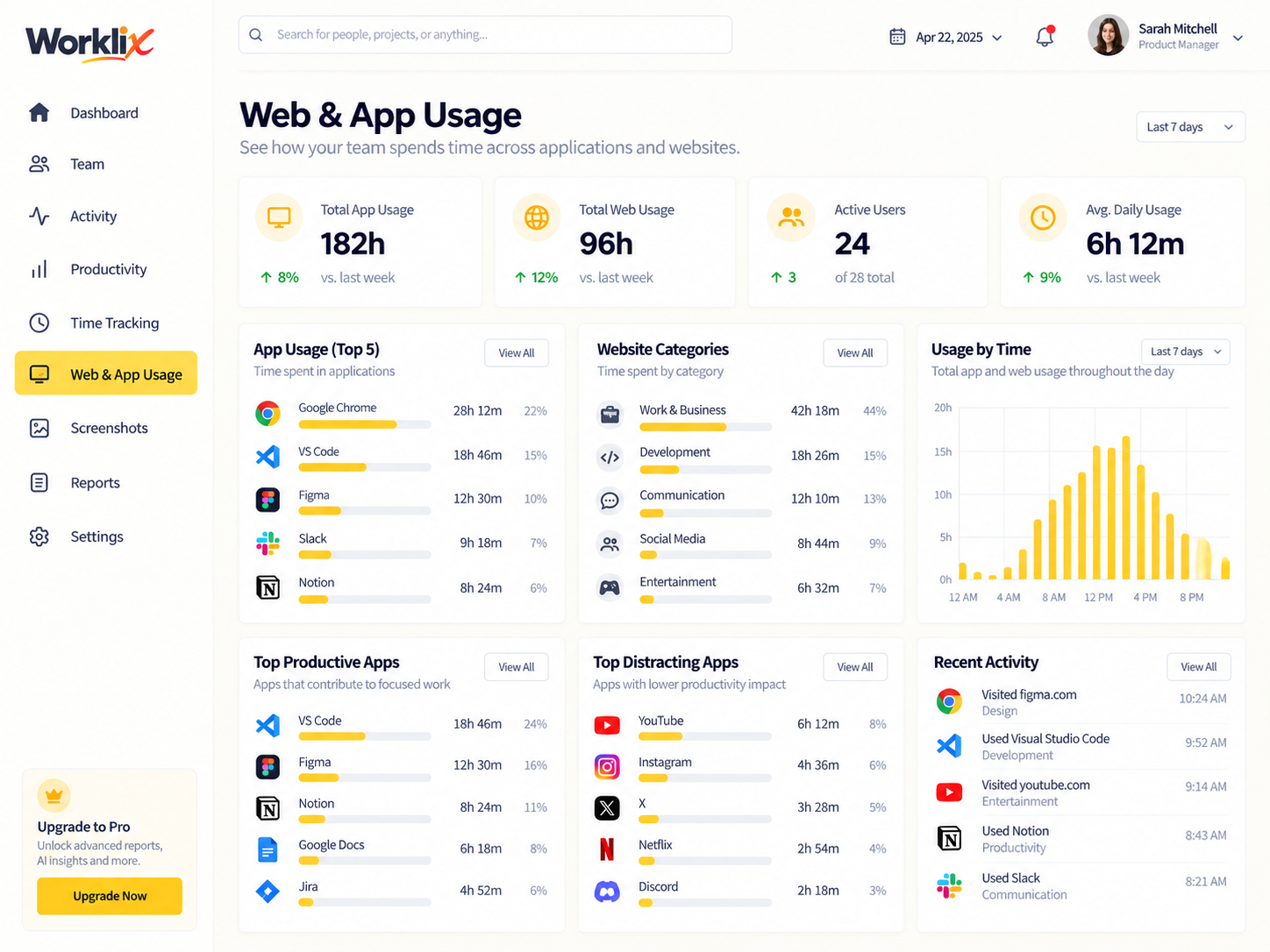
Desktop apps and browser activity are easier to understand when the day is read as a sequence. See where focused work lasted, when browser research expanded, how often tools changed, and which transitions deserve a closer review without turning every application switch into a separate conclusion.
Focus block beginsA longer application session shows where concentrated work started.
Browser research expandsWebsite usage stays visible as a separate part of the workday instead of blending into desktop app time.
Tool switching increasesShorter sessions become easier to review against the work around them.
FocusLonger uninterrupted work blocks
SwitchingChanges between active tools
BrowserDomain activity kept distinct

Patterns before conclusionsIs the team spending too much time switching? Are important tools underused? Does the pattern repeat?
Use digital activity to askbetter workflow questions.
App and website data is most useful when it helps explain how work gets done. Compare patterns over time, identify repeated tool switching and understand whether the current workflow supports the team or gets in its way.
Look for repeated short sessions across several tools instead of assuming the problem is focus.
Compare role expectations with the applications that actually appear in the workday.
Use days and weeks of activity to separate a real trend from one unusual session.
Compare at the right level
Move from individual activityto team-wide context.
Switch between employee, team and department views so app usage can be reviewed against the structure of the workforce rather than as isolated activity.
Usage distributionEmployee view
Last 7 days68%
Core work68%Communication21%Other11%
Most tracked time is concentrated in development, documentation and team communication tools.
Review without losing the evidence
Turn usage patterns intoclearer manager conversations.
Use the same records to review trends, compare categories and discuss workflow changes with a visible trail of app and website activity behind the decision.
ToolTypeTimeTrendContext
Visual Studio CodeDesktop appProductive12h 42m↗ 8%Primary development tool
SlackDesktop appNeutral5h 18m→ 1%Team communication
ChromeBrowserMixed4h 06m↓ 6%Docs, research and support
App & website tracking questions
Understand the activitybefore you act on it.
Use app and website data as operational context alongside time, attendance and team structure.
What does app and website tracking show?
It can show which applications and domains appear during tracked work and how much active time is associated with them.
Can tools be classified by productivity?
Yes. Productivity labels can help separate core work tools, neutral supporting tools and activity that needs closer review.
Can managers compare teams or employees?
Usage becomes more useful when it can be reviewed at employee, team or department level with the right access controls.
Should one website visit determine performance?
No. A single visit rarely explains a workday. Review patterns across time and alongside the employee's role and workflow.
Digital activity, useful context
See where work time goeswithout losing the work around it.
Connect app and website usage with time, people and team context in the same Worklix workspace.